
Abstract
In the evolving landscape of software development, automated testing tools play a crucial role in maintaining application quality and functionality.
This white paper comprehensively compares object-based and recording-based automated testing tools. It explores the benefits and challenges of each approach, offering insights into test stability, complexity handling, maintenance, and integration into CI/CD pipelines.
This article is designed to help professional testers choose the right test automation tool for their specific needs, ensuring the efficiency and robustness of their testing processes. Find out how using the right test tool can improve your testing strategy and lead to better software quality results.
Content of this White Paper
- Tools Comparison: Object-based VS Recording-based. What key differences are?
- Criteria for Choosing Between Tools: Key factors to consider for selecting a tool.
- Scenarios for Preference: Specific use cases where each type of tool excels.
- Cost & Resources: Time, resources & training required for implementing each tool.
- CI/CD Integration: How each tool fits into continuous integration and deployment.
- Conclusion and Recommendations: Summary and advice on selecting the right tool for your testing needs.
Comparison of Automated Testing Tools
Maintenance of Tests
Object-Based Tools
Object-based tools define tests based on the user interface (UI) objects created by developers. These tools utilize object recognition to identify UI components, making tests highly stable even when minor changes occur in the application.
For example, if a button is moved slightly or a label is updated, the test will still recognize the button or label based on its attributes rather than its exact position.
This significantly reduces the maintenance burden as tests remain unaffected by minor UI modifications.
Recorder Tools
Recorder tools create tests by recording UI manipulations during the application's operation.
Any change in the UI, such as a label's text or a control's position, necessitates re-recording the affected tests.
This repetitive process can be time-consuming and counterproductive, undermining the purpose of automated testing.
Key Points:
Object-Based Tools
Stability: Tests remain valid despite minor UI changes.
Reduced Maintenance: Less frequent need to update tests saves time and resources.
Example Tools: Tools like AscentialTest, TestComplete, and UFT (Unified Functional Testing).
Key Points:
Recorder Tools
Fragility: Tests are sensitive to any UI changes, even minor ones.
High Maintenance: Frequent re-recording of tests increases workload.
Example Tools: Tools like Ranorex, TestProject or Eggplant.
Creation and Reusability of Tests
Object-Based Tools
Object-based tools allow testers to define and reuse test actions efficiently.
Tests are created by specifying actions on UI objects, which can be reused across multiple tests. This modular approach simplifies test creation and maintenance.
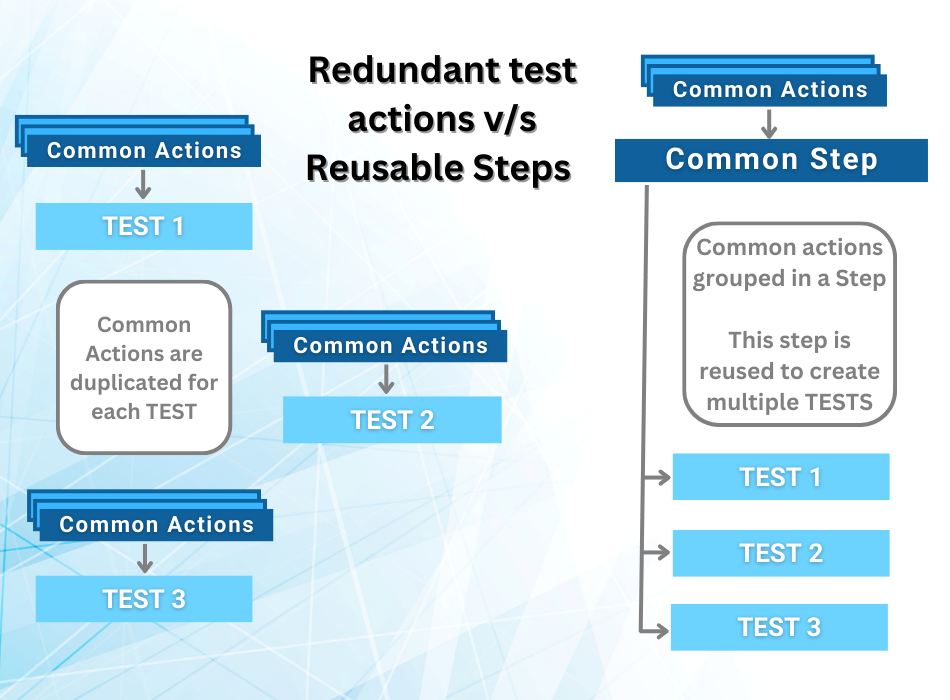
Additionally, in tools like AscentialTest, common actions can be grouped into reusable blocks called "steps," which significantly enhance the reusability and maintainability of tests.
Recorder Tools
Recorder tools often require testers to record common manipulations repeatedly for different tests.
This lack of reusability increases the effort and time needed for test creation and updating.
Key Points:
Object-Based Tools
Modularity: Actions can be reused, enhancing efficiency.
Simplified Maintenance: Updates to a single action propagate to all tests using it.
Exclusive Feature: AscentialTest’s “steps” for reusable actions.
Key Points:
Recorder Tools
Redundancy: Common actions must be recorded multiple times.
Inefficiency: Increased effort for test creation and maintenance.
Recognition of Objects
Object-Based Tools
These tools use object attributes to identify UI components, ignoring the object hierarchy.
This method makes tests less vulnerable to changes in the application's structure. When an object cannot be found, the tool highlights the issue, allowing users to update the object attributes easily.
Recorder Tools
Recorder tools rely on methods like XPath to locate UI elements.
Changes in the application's page hierarchy can disrupt the object definitions, causing tests to fail and necessitating re-recording.
Key Points:
Object-Based Tools
Robustness: Less affected by changes in UI hierarchy.
Ease of Update: Simple adjustments when objects change.
Key Points:
Recorder Tools
Vulnerability: Common actions must be recorded multiple times.
High Maintenance: Increased effort for test creation and maintenance.
Support for Components
Object-Based Tools
Generally, object-based tools support a wide range of application components, ensuring comprehensive test coverage. This includes not only standard UI elements but also custom controls and non-GUI components.
AscentialTest can, for example, connect to your database to validate read or update operations to be performed by the application, check that pdf documents are generated correctly and that their content is as expected, etc.
Recorder Tools
These tools can validate standard objects but struggle with custom, image-based, and non-GUI components, limiting their effectiveness.
Key Points:
Object-Based Tools
Comprehensive Coverage: Supports various application components.
Flexibility: Adaptable to different types of applications.
Key Points:
Recorder Tools
Limited Coverage: Challenges with non-standard components.
Restricted Use: Less adaptable to complex applications.
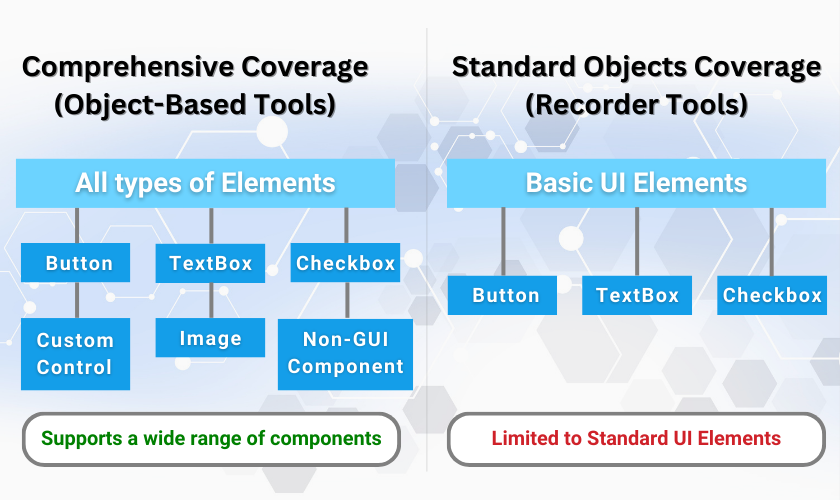
Object-based tools offer better coverage than Recording tools.
Choosing the right tool for your project:
A comparative guide for professional testers
Key criteria for making your choice
When deciding between object-based and recording-based automated testing tools, you should consider several criteria:
1. Application Stability and Maintenance
- Object-Based: these tools are advantageous if your application’s UI undergoes frequent changes, as they rely on object attributes rather than hierarchical structures. This makes them more stable and less prone to breaking with minor UI adjustments.
- Recording-Based: best suited for applications with a stable UI, where changes are rare. These tools can be less efficient if the UI is subject to regular updates, as re-recording tests becomes necessary.
2. Complexity of Test Cases
- Object-Based: ideal for complex test scenarios involving custom controls, non-GUI components, and interactions with databases or external files. Their ability to handle a wide range of components makes them versatile.
- Recording-Based: suitable for simpler test cases focused on standard UI elements. They can struggle with complex scenarios involving custom or non-standard components. Supporting such scenarios would involve writing scripts, which requires development skills, as well as significant additional time and costs.
3. Test Maintenance and Reusability
- Object-Based: offer better reusability through modular test components like steps in AscentialTest. These tools reduce maintenance efforts by allowing updates to individual steps or components, which propagate across all tests.
- Recording-Based: generally require more effort for maintenance, as common actions must be re-recorded for each test. This increases redundancy and the time required for updates.
4. Resource Availability and Expertise
- Object-Based: Typically require more initial setup and a deeper understanding of the tool's capabilities. They may necessitate some training but offer significant long-term benefits in terms of maintenance and flexibility.
- Recording-Based: Easier to use for beginners with less technical expertise. They offer quick test creation through recording, but can quickly become costly if tests become complex and require script development, or if maintenance efforts increase due to frequent UI changes.
Scenarios Where Each Approach is Preferable
1. Object-Based
- Dynamic and Frequently Changing Applications: Applications that undergo regular UI changes, either due to iterative development or frequent updates, benefit from the stability of object-based tools.
- Complex Enterprise Applications: Applications with extensive custom controls, integrations with databases, and non-GUI components are better suited for object-based tools due to their comprehensive coverage and flexibility.
2. Recording-Based
- Recording-Based: Applications with a stable UI that do not undergo frequent changes are ideal candidates for recording-based tools. The initial ease of use and rapid test creation are significant advantages.
- Simple Applications: Applications with straightforward user interactions and standard UI elements can be effectively tested using recording-based tools, minimizing the need for complex configurations.
Costs Associated with Implementation
1. Object-Based
- Time: Initial setup time can be higher due to the need to define objects and configure tests. However, the long-term maintenance time is significantly reduced.
- Resources: Requires skilled testers with a good understanding of object recognition and the tool’s features. Training may be necessary to maximize the tool’s potential.
2. Recording-Based
- Time: Quick to set up and start using, as tests are created through recording user interactions. However, frequent re-recording can add to the time required for ongoing maintenance.
- Resources: Easier for less experienced testers to use, with minimal initial training required. Suitable for teams with limited resources and technical expertise, but only if the application and tests are simple. Otherwise, it will require writing scripts, which will imply development skills and high test creation and maintenance costs.
Integration into CI/CD Pipelines
1. Object-Based
- Integration: These tools often integrate well into CI/CD pipelines due to their robustness and ability to handle changes. They can be configured to run tests automatically with each build, ensuring continuous feedback and quality assurance.
- Scalability: Object-based tools are scalable, capable of handling a large number of tests efficiently. Their modularity allows for easy updates and additions to the test suite as the application evolves. To facilitate scalability, AscentialTest can distribute a large number of tests across several machines for faster execution. It will then automatically assemble the results and generate a global test report.
2. Recording-Based
- Integration: These tools can be integrated into CI/CD pipelines, but their fragility can pose challenges. Frequent changes in the UI may lead to broken tests, requiring re-recording and manual intervention.
- Scalability: While they are quick to set up, the scalability of recording-based tools is limited by their maintenance overhead. As the number of tests grows, maintaining them can become increasingly cumbersome.
Advantages Specific to AscentialTest
Concept of Step
One of the most compelling features of AscentialTest is its unique concept of "Step."
Steps are reusable blocks of actions that can be assembled to create tests. This feature is not commonly found in other object-based tools. Steps allow for:
- Reusable Test Components: Common actions (e.g., logging into an application) can be defined once and reused across multiple tests.
- Efficient Maintenance: When the application changes, updating a few steps automatically updates all related tests, saving significant time and effort.
Extensive Component Support
AscentialTest supports a broad array of application components, including custom objects, images, and rendered text. It also handles various formats such as ODBC databases, XML, text files, .ini files, and PDFs. This comprehensive support ensures that all aspects of the application can be tested thoroughly.
Key Points:
Wide Compatibility: Ensures comprehensive testing coverage.
Adaptability: Supports multiple data formats and components.

AscentialTest: Extensive Component Support
Drag & Drop Interface
AscentialTest is designed to be user-friendly, with a drag-and-drop interface that eliminates the need for extensive coding. It builds the testing project gradually as users capture objects and create steps.
One of the biggest advantages of AscentialTest is the 'snapshot': you can automatically capture all the elements composing a screen, then define objects by drag and drop. You can also create steps and tests with drag and drop.
Additionally, AscentialTest automatically generates test data tables and links them to test parameters, streamlining the testing process.
Key Points:
User-Friendly Interface: Simplifies the creation and maintenance of tests.
Snapshots: Select objects by drag & drop from the UI.
Automation of Data Handling: Automatic generation and linking of test data.
Conclusion and Recommendations
Object-based tools offer greater stability, reusability and flexibility, making them a better choice for automated testing.
Among these tools, AscentialTest stands out for its unique features, such as its step-by-step concept, extensive component support and ease of implementation. It is particularly well suited to professional testers looking for efficiency, robustness and complete test coverage.
Its ability to simplify maintenance and improve test reuse makes it an invaluable tool in the automated testing landscape.